 Start crafting and choose when to stop in Melvor Idle 2
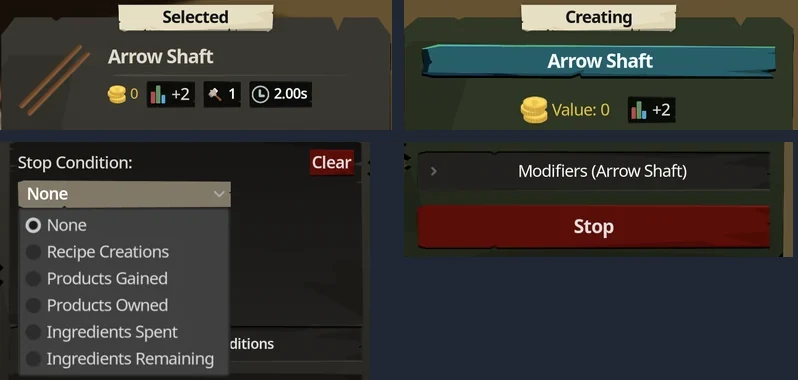
Choosing a recipe in Fletching, Crafting or another artisan skill fills the Selected panel: the item's sale value, XP, crafting steps and time per step, each ingredient with how many you have, and the output quantity. Nothing starts until you press Create.
Start and stop
Create moves the recipe to the Creating panel, which shows its step progress, its time and a red Stop button. Stop ends production and makes Create available again. While a recipe is being created, Create stays greyed out for that same recipe.
Pick a stop condition before you press Create
Open Manage Stop Conditions at the bottom of the Selected panel. The Stop Condition list offers:
| Option | Stops when |
|---|---|
| None | you press Stop or run out of ingredients |
| Recipe Creations | the recipe has been completed Count times |
| Products Gained | you have gained the chosen quantity of the chosen product since starting |
| Products Owned | your bank holds the chosen quantity of the product; only offered while you hold fewer |
| Ingredients Spent | you have spent the chosen quantity of the chosen ingredient |
| Ingredients Remaining | your bank is down to the chosen quantity of the ingredient; only offered while you hold more |
Clear removes the condition. The condition goes with the recipe when you press Create. Setting one while the same recipe is already running does not stop that batch, so press Stop and then Create again.
Crafts and products are different counts
An Arrow Shaft craft takes one Normal Log and one 2.00 s step, and gives 20 Arrow Shaft and 2 Fletching XP. Recipe Creations counts crafts and the other options count items, so 1,000 shafts is Products Gained 1,000; Recipe Creations 1,000 would make 20,000.
Cooking
Cooking uses the same Selected panel, Create, Stop and stop conditions, with a Difficulty box added: your Cooking proficiency against the dish's difficulty gives the Success Chance. Shrimp shows 70.00% at Cooking level 1.