 Find loadouts and compare equipment in Melvor Idle 2
Loadouts
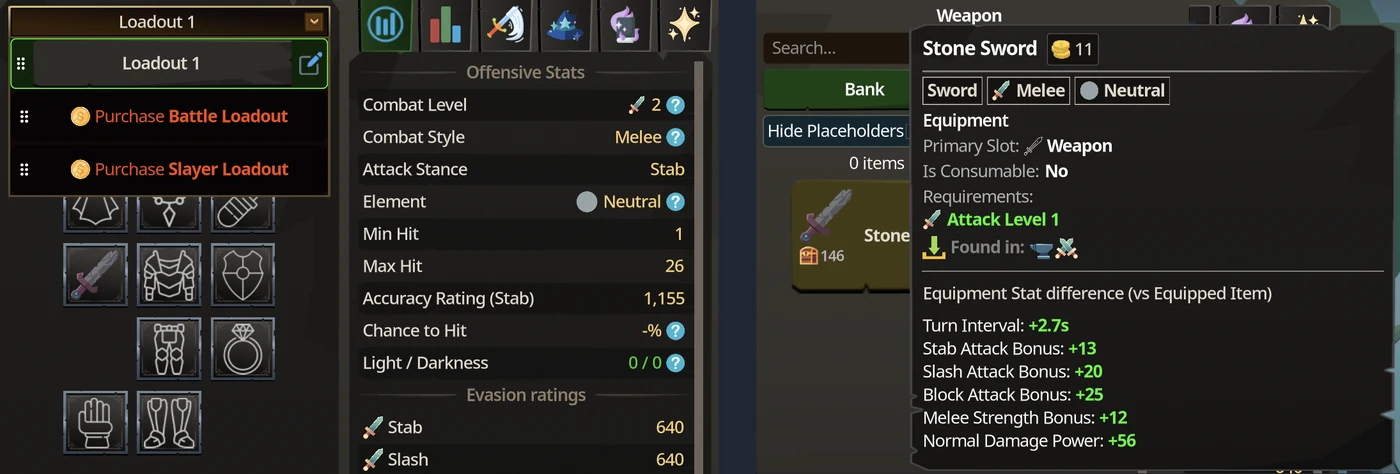
Loadouts live on the Combat page, in the menu above the equipment slots. It shows the current loadout (Loadout 1 on a new character) with a button to rename it. More loadouts are bought from the same menu: Purchase Battle Loadout and Purchase Slayer Loadout.
Compare an item with what you wear
Click an equipment slot to open its picker. It lists what you can put in that slot, with Bank and A-Z sorting, a search box, Hide Placeholders, Hide Locked, Show Hidden and an Unequip button. Hover an item to see its card, ending in Equipment Stat difference (vs Equipped Item).
The card lists every stat the item changes, with its difference. A Stone Sword against an empty weapon slot shows a 2.7 s turn interval (the attack takes 2.70 s instead of 4.00 s unarmed), +13 stab, +20 slash and +25 block attack bonus, +12 melee strength bonus and +56 normal damage power. Equipping it also changes the stances offered, from Stab, Slash, Crush and Block to Stab, Slash and Block.
Check an item before you make it
When the selected recipe makes one piece of equipment, such as Stone Sword in Smithing or Normal Bow in Fletching, the Selected panel has a View Stats button under the item.
Skill items
Hobforge Gloves are not combat gear: they fit the Smithing Gloves Toolbelt slot and give Smithing bonuses. The Normal Bow, by contrast, is a combat weapon compared in the picker above.